Label scanning
How to Identify Wine by Label: A Practical Guide for Buyers
Every wine label is a compressed story: who made it, where it grew, and often what year it was bottled. The challenge is turning those clues into a confident decision while the bottle is still in your hand.
Key takeaways
- Start with producer, region, and vintage — they narrow 80% of identifications.
- Old-world labels often omit grape variety; the appellation tells you the style.
- A label scan beats manual search when you need an answer in under a minute.
Label anatomy
The five clues that identify most bottles
Wine labels vary by country, but most share a backbone: producer or brand name, geographic origin, vintage year, and sometimes grape variety or cuvée name. On a Napa Cabernet, the grape is usually front and center. On a Burgundy, the village name — Gevrey-Chambertin, Puligny-Montrachet — carries more weight than any grape listing, because regional law already defines what is in the bottle.
Appellation tiers matter. In France, AOC (now AOP) boundaries restrict grape, yield, and winemaking. In Italy, DOC and DOCG labels signal regulated origin. In Spain, D.O. and D.O.Ca. play the same role. Recognizing these abbreviations helps you infer style before you ever taste the wine.
Secondary labels add context: importer name, alcohol percentage, volume, and sometimes a lot number. Back labels often list tasting notes or food suggestions written by the winery — useful, but not always accurate for the specific vintage in your hand.
Manual vs. scan
When searching by hand breaks down
Manual identification means typing producer + region + vintage into a search engine, then comparing bottle images until one matches. That works for famous wines with distinctive labels. It fails when two vintages look identical, when the producer has twelve cuvées, or when you are standing in a dim shop aisle with spotty signal.
Similar label names create false matches. A search for "Château Margaux" might surface the grand vin, the second wine (Pavillon Rouge), or an entirely different estate with a similar name. Vintage swaps are common too — the 2019 and 2020 labels may differ only in a single digit.
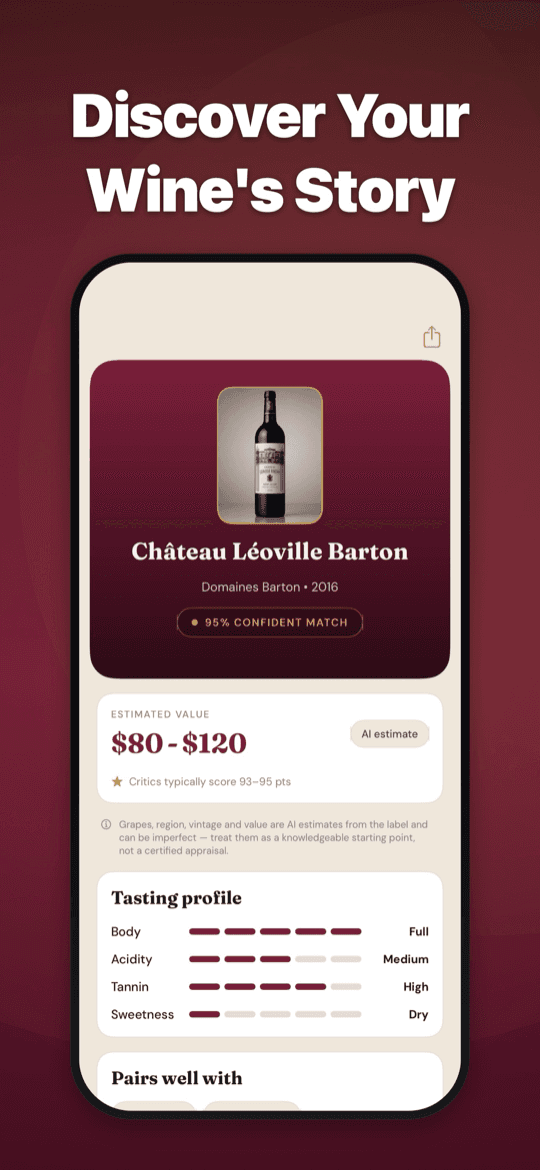
Wine Identifier reads the label photographically and returns a structured dossier: likely identity, grape blend, region, tasting profile, serving guidance, food pairings, and an AI-derived value range. The result is saved automatically so you can revisit it later without re-scanning.
Decision framework
Identification is only step one
Knowing the bottle name answers "what is this?" The questions that follow are what actually drive purchase: Is it full-bodied or bright? Will it work with tonight's lamb? Is the shelf price fair? Does it need decanting?
Structure tells you more than flavor adjectives. Body (light to full), acidity (crisp to soft), tannin (smooth to grippy), and sweetness level predict how a wine behaves with food and whether it needs air or chill. A label scan that returns these structural notes turns recognition into a decision.
For collectors and repeat buyers, saved scans build a personal reference. The bottle you loved at a friend's dinner three months ago becomes findable again — producer, vintage, tasting notes, and value context included.
Accuracy limits
What label identification cannot guarantee
No app certifies every bottle. Damaged labels, handwritten text, library releases with minimal branding, and extremely rare wines may produce lower-confidence results. Wine Identifier marks AI inferences clearly rather than presenting guesses as facts.
Counterfeit bottles exist in the fine wine market. Label recognition cannot verify provenance, storage history, or authenticity — only what the label appears to say. For high-value purchases, cross-check with trusted merchants or professional authentication.
Treat AI value ranges as orientation, not appraisal. Market prices shift with vintage quality, regional demand, and seller markup. The range helps you spot outliers; it does not replace a formal valuation.
Try it yourself
Scan any label. Get the full dossier.
Wine Identifier is free to download with one complete scan per day. Pro unlocks unlimited scans, the full Wine Library, and cellar value insights — built for shops, restaurants, and home cellars.
FAQ
Common questions
Can an app identify any wine label?+
Most commercial bottles with readable front labels identify well. Obscure, damaged, or handwritten labels may return lower-confidence results. Wine Identifier treats every output as an AI inference, not a certified identification.
What if two wines have nearly identical labels?+
Check vintage, cuvée name, appellation tier, and bottle shape. Small text differences — "Riserva" vs. standard, village vs. premier cru — often distinguish bottles that look alike at a glance.
Do I need to photograph the back label too?+
The front label usually carries the strongest identification signals. A back label helps when it lists importer details, grape percentages, or a distinct lot code that disambiguates similar front labels.
How is this different from Vivino or CellarTracker?+
Wine Identifier focuses on instant label-to-dossier conversion: scan, get tasting notes, pairings, serving guidance, and value context in one step. Other apps excel at community ratings and large databases; Wine Identifier excels at speed when the bottle is in front of you.